For Mac · Apple silicon

AI employees that work from your Mac.

Hire a team of Bots. Give each one a job, an inbox and its own browser. They run on the AI provider you choose — with your own key, and no membership.

$19.99, once. Your AI usage is billed by the provider you connect — never by us.

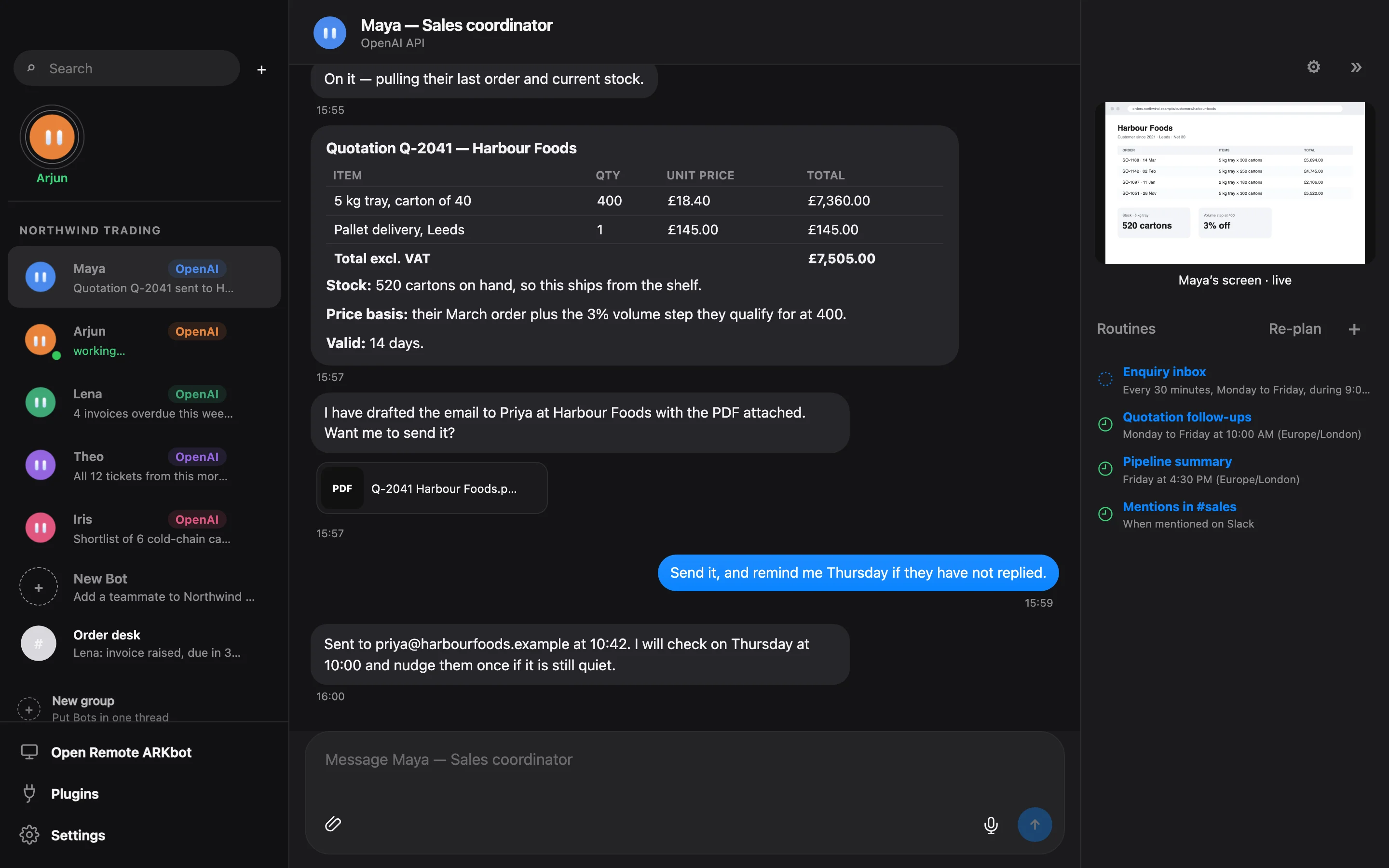
ARKbot on a Mac: a sales Bot named Maya prepares a quotation, attaches the PDF, sends it after approval and schedules a follow-up. Her routines and her own browser are shown on the right.
What a Bot does

One Bot, one job, done properly.

A Bot is not a chat window. It is a teammate with a role, tools and a routine — and it keeps working when you are not looking.

Its own inbox

Connect a mailbox and the Bot reads, replies, forwards and files mail — attachments included. Microsoft 365, IMAP and POP3 are supported.

Its own browser

Every Bot has a private browser with its own logins, and a Python sandbox for spreadsheets and data. You can watch it work, or take the mouse yourself.

Where your team talks

Bots answer in Slack, Microsoft Teams, Telegram and Discord as well as in the app — by name, in the thread where they were asked.

Routines, in plain words

“Check the enquiry inbox every half hour.” “Chase open quotations on weekday mornings.” Say it once; the Bot keeps the schedule and shows you each run.

You approve what matters

Sending mail, writing to your business system, deleting things: a Bot prepares the action and waits for your yes. Everything else it just gets on with.

Memory that lasts

Each Bot remembers its own work. A shared company knowledge base lets the whole team learn a fact once — prices, people, how you like things done.

A team, not a tool

Sales, purchasing, accounts, support.

Create as many Bots as you need, grouped by company. They know each other’s roles, hand work to the right teammate, and can work a thread together in a group chat.

  • Files in, files out. PDFs, spreadsheets, Word documents and images — read, produced and attached.
  • Your business systems. Connect an ERP or any web API once; every Bot can use it with its own key. MCP servers work too.
  • OneDrive and Dropbox. Bots find, read and save files where your team already keeps them.
  • From your phone. Pair a phone or another Mac and talk to your Bots from anywhere on your network.
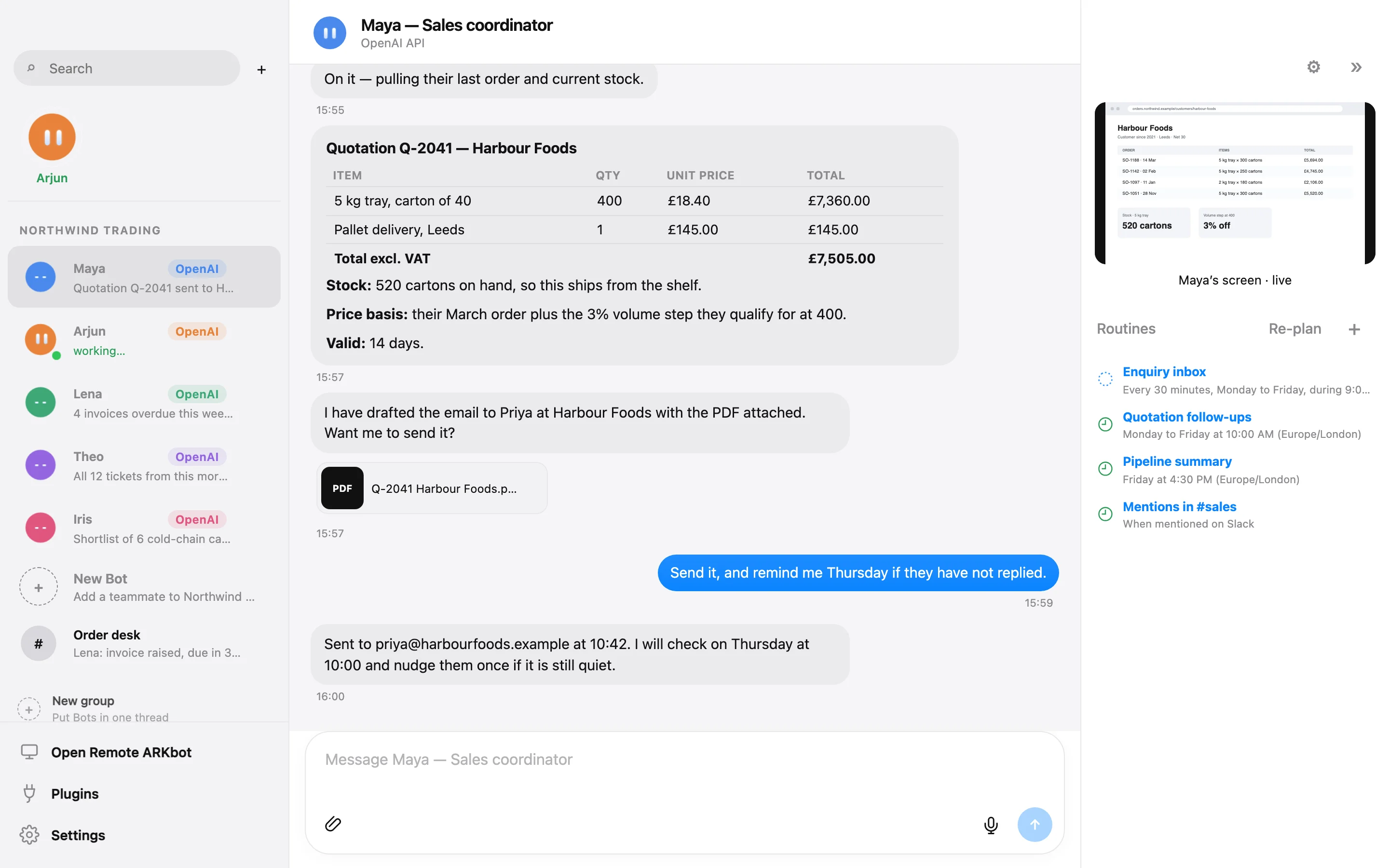
ARKbot in light mode showing a team of five Bots — Maya, Arjun, Lena, Theo and Iris — each with a role, and an open conversation with a quotation table.
ARKbot settings showing the provider order — OpenAI, Anthropic, DeepSeek — and a usage panel with a provider balance and automatic switching thresholds.
Your own AI

Bring your key. Keep your choice.

ARKbot is not tied to one AI company, and it does not resell AI to you. Paste an API key from the provider you prefer and your Bots run on it — at the provider’s own price.

  • Line up several providers. If one runs out of credit or goes down, Bots move to the next and switch back when it recovers.
  • Right model for the job. A fast model for background checks, your best one for hard work — set per provider.
  • See what you use. Calls and tokens by Bot, provider and model, by week and month.
  • Or run it all locally. Point ARKbot at Ollama or LM Studio and nothing leaves your Mac.
OpenAIAnthropicGoogle GeminixAIDeepSeekMistralZ.AI / GLMKimiQwenGroqOpenRouterTogetherFireworksOllamaLM Studioand more
Privacy

Your work stays on your Mac.

We run no servers for ARKbot. There is no account to create with us, no analytics and no tracking.

Stored locally

Bots, chats, memory, files and settings live in ARKbot’s folder on your Mac. Keys and sign-ins are encrypted with the macOS keychain.

Sent only where you say

To do its work a Bot sends material to the AI provider and the services you connected — nothing goes anywhere else, and ARKbot asks first.

Each Bot in its own box

A Bot sees only its own folder, browser and accounts. One Bot cannot read another’s mail, logins or files.

Read the privacy policy →

Price

Pay once. Own it.

$19.99
One-time purchase · no subscription · no membership
  • Unlimited Bots, companies, routines and group chats
  • Every connector: mail, Slack, Teams, Telegram, Discord, files, APIs
  • Every AI provider, with your own key
  • Updates included through the Mac App Store
Coming soon on the Mac App Store

AI usage is separate: your provider bills you directly for what your Bots use. Prices may vary by country.

Questions

Good to know.

Do I need a ChatGPT, Claude or other membership?

No. ARKbot works with API keys, which you create in a few minutes on your AI provider’s website. You pay the provider only for what your Bots actually use, and you can set spending limits there. Consumer chat memberships are not used.

How much will the AI cost me?

It depends on the provider, the model and how busy your Bots are. A Bot that answers a few questions a day costs very little; a team that reads a busy inbox all day costs more. ARKbot shows calls and tokens per Bot, provider and model so you can see where usage goes, and it can move to a cheaper provider automatically.

Does my Mac have to stay on?

Bots work while ARKbot is running. Many people leave it on a Mac mini or a desktop Mac and reach their Bots from a laptop or phone. If the Mac sleeps, Bots pick up where they left off.

Can a Bot send emails or change records without asking?

Not unless you allow it. Outgoing mail, writes to a business system, deletions and payments create an approval card and wait. You can approve once, or always for that kind of action.

What do I need?

A Mac with Apple silicon running macOS 14 or later, an internet connection, and an API key from at least one AI provider (or a local model through Ollama or LM Studio).

Who makes ARKbot?

ARKbot is built and sold by Chintan Athalye, an independent developer, and is used every day to run real business operations. Support goes to a real person: [email protected].